hckrnws
After building Depot [0] for the past three years, I can say I have a ton of scar tissue from running BuildKit to power our remote container builders for thousands of organizations.
It looks and sounds incredibly powerful on paper. But the reality is drastically different. It's a big glob of homegrown thoughts and ideas. Some of them are really slick, like build deduplication. Others are clever and hard to reason about, or in the worst case, terrifying to touch.
We had to fork BuildKit very early in our Depot journey. We've fixed a ton of things in it that we hit for our use case. Some of them we tried to upstream early on, but only for it to die on the vine for one reason or another.
Today, our container builders are our own version of BuildKit, so we maintain 100% compatibility with the ecosystem. But our implementation is greatly simplified. I hope someday we can open-source that implementation to give back and show what is possible with these ideas applied at scale.
> It's a big glob of homegrown thoughts and ideas. Some of them are really slick, like build deduplication. Others are clever and hard to reason about, or in the worst case, terrifying to touch.
This is true of packaging and build systems in general. They are often the passion projects of one or a handful of people in an organization - by the time they have active outside development, those idiosyncratic concepts are already ossified.
It's really rare to see these sorts of projects decomposed into building blocks even just having code organization that helps a newcomer understand. Despite all the code being out in public, all the important reasoning about why certain things are the way they are is trapped inside a few dev's heads.
As someone who has worked in the space for a while and been heavily exposed to nix, bazel, cmake, bake, and other systems, and also been in that "passion project" role, I think what I've found is that these kinds of systems are just plain hard to talk about. Even the common elements like DAGs cause most people's eyes to immediately glaze over.
Managers and executives are happy to hear that you made the builds faster or more reliable, so the infra people who care about this kind of thing don't waste time on design docs and instead focus on getting to a minimum prototype that demonstrates those improved metrics. Once you have that, then there's buy-in and the project is made official... but by then the bones have already been set in place, so design documentation ends up focused on the more visible stuff like user interface, storage formats, etc.
OTOH, bazel (as blaze) was a very intentionally designed second system at Google, and buildx/buildkit is similarly a rewrite of the container builder for Docker, so both of them should have been pretty free of accidental engineering in their early phases.
I don't think you can ever get away from accidental engineering in build systems because as soon as they find their niche something new comes along to disrupt it. Even with something homegrown out of shell scripts and directory trees the boss will eventually ask you to do something that doesn't fit well with your existing concepts.
A build system is meant to yield artifacts, run tools, parallelize things, calculate dependencies, download packages, and more. And these are all things that have some algorithmic similarity which is a kind of superficial similarity in that the failure modes and the exact systems involved are often dramatically different. I don't know that you can build something that is that all-encompassing without compromising somewhere.
Blaze and bazel may have been intentionally designed, but it was designed for Google's needs, and it shows (at least from my observations of bazel, I don't have any experience with blaze). It is better now than it was, but it obviously was designed for a system where most dependencies are vendored, and worked better for languages that google used like c++, java, and python.
Blaze instead of make, ant, maven. But now there's cmake and ninjabuild. gn wraps ninjabuild wraps cmake these days fwiu.
Blaze is/was integrated with Omega scheduler, which is not open.
Bazel is open source.
By the time Bazel was open sourced, Twitter had pantsbuild and Facebook had buck.
OpenWRT's Makefiles are sufficient to build OpenWRT and the kernel for it. (GNU Make is still sufficient to build the Linux kernel today, in 2026.)
Make compares files to determine whether to rebuild them if they already exist; by comparing file modification time (mtime) unless the task name is in the .PHONY: list at the top of the Makefile. But the task names may not contain slashes or spaces.
`docker build` and so also BuildKit archive the build chroot after each build step that modifies the filesystem (RUN, ADD, COPY) as a cacheable layer identified by a hash of its content.
Other Dockerfile instructions add metadata: CMD, ENTRYPOINT, LABEL, ENV, ARG, WORKDIR, USER, EXPOSE <port/tcp>, VOLUME <path>.
The FROM instruction creates a build stage from scratch or from a different container layer.
Dockerfile added support for Multi-stage builds with multiple `FROM` instructions in 2017 (versions 17.05, 17.06CE).
`docker build` is now moby and there is also buildkit? `podman buildx` seems to work.
nerdctl supports a number of features that have not been merged back to docker or to podman.
> it obviously was designed for a system where most dependencies are vendored, and worked better for languages that google used like c++, java, and python.
Those were the primary languages at google at the time. And then also to build software? Make, shell scripts, python, that Makefile calls git which calls perl so perl has to be installed, etc.
Also gtests and gflags.
"Compiler Options Hardening Guide for C and C++" https://news.ycombinator.com/item?id=43551959 :
>> There are default gcc and/or clang compiler flags in distros' default build tools; e.g. `make` specifies additional default compiler flags (that e.g. cmake, ninja, gn, or bazel/buck/pants may not also specify for you).
Which CPU microarchitectures and flags are supported?
  ld.so --help | grep "supported"
  cat /proc/cpuinfo | grep -E '^(flags|bugs)'`
How to add an `-march=x86-64-v3` argument to every build?
How to add build flags to everything for something like x86-64-v4?
Which distros support consistent build parametrization to make adding global compiler build flags for multiple compilers?
- Gentoo USE flags
- rebuild a distro and commit to building the core and updates and testing and rawhide with your own compiler flags and package signatures and host mirrored package repos
- Intel Clear Linux was cancelled.
- CachyOS (x86-64-v3, x86-64-v4, Zen4)
- conda-forge?
Gentoo:
- ChromiumOS was built on gentoo and ebuild IIRC
- emerge app-portage/cpuid2cpuflags, CPU_FLAGS_X86=, specify -march=native for C/[C++] and also target-cpu=native for Rust in /etc/portage/make.conf
- "Gentoo x86-64-v3 binary packages available" (2024) https://news.ycombinator.com/item?id=39250609
Google, Facebook, and Twitter have a monorepo to build packages from.
Google had a monorepo at the time that blaze was written.
Twitter ("X") is moving from pantsbuild to blaze BUILD files.
TIL there is a buck2. How does facebook/buck2 compare to google/bazel (compare to what is known about blaze)?
Should I build containers (chroot fs archives) with ansible? Then there is no buildkit.
FWIW `podman-kube-play` can run some kubernetes yaml.
The ansible-in-containers thing is very much an unsolved problem. Basically right now you have three choices:
- install ansible in-band and run it against localhost (sucks because your playbook is in a final image layer; you might not want Python at all in the container)
- use packer with ansible as your provisioner and a docker container export, see: https://alex.dzyoba.com/blog/packer-for-docker/
- copy a previous stage's root into a subdirectory and then run ansible on that as a chroot, afterward copy the result back to a scratch container's root.
All of these options fall down when you're doing anything long-running though, because they can't work incrementally. As soon as you call ansible (or any other tool), then from Docker's point of view it's now a single step. This is really unfortunate because a Dockerfile is basically just shell invocations, and ansible gives a more structured and declarative-ish way to do shell type things.
I have wondered if a system like Dagger might be able to do a better job with this, basically break up the playbook programmatically into single task sub-playbooks and call each one in its own Dagger task/layer. This would allow ansible to retain most of its benefits while not being as hamstrung by the semantics of the caller. And it would be particularly nice for the case where the container is ultimately being exported to a machine image because then if you've defined everything in ansible you have a built-in story for freshening that deployed system later as the playbook evolves.
> This is true of packaging and build systems in general. They are often the passion projects of one or a handful of people in an organization
This is a very insightful comment
I introduced Depot at my org a few months ago and I've been very happy with it. Conceptually it's simple: a container builder that starts warm with all your previously built layers right there, same as it would be running local builds. But a lot goes into making it actually run smoothly, and the performance-focused breakdown that shows where steps depend on each other and how much time each is taking is great.
It's clear a ton of care has gone into the product, and I also appreciated you personally jumping onto some of my support tickets when I was just getting things off the ground.
Thank you for the very kind words and for your support. Depot is full of incredible people who love helping others. So while you might see me on a ticket from time to time, it’s really an entire team that is behind everything we do.
Looks very interesting, am I reading it correctly that this is only available on AWS for "bring your own compute"?
Thanks for the insight Kyle. If Depot can open-source it, that would be amazing for the community.
Thank you for the post! It’s well done and you captured a lot of the concepts in BuildKit in an easy to understand way. Not an easy thing to do at all.
I don't use buildkit for artifacts, but I do like to output images to an OCI Layout so that I can finish some local checks and updates before pushing the image to a registry.
But the real hidden power of buildkit is the ability to swap out the Dockerfile parser. If you want to see that in action, look at this Dockerfile (yes, that's yaml) used for one of their hardened images: https://github.com/docker-hardened-images/catalog/blob/main/...
i did include a repo example on how to create custom frontend as well https://github.com/tuananh/apkbuild
I agree on both fronts! BuildKit frontends are not very well known but can be very powerful if you know how they work and how BuildKit transforms them.
The --mount=type=cache for package managers is genuinely transformative once you figure it out. Before that, every pip install or apt-get in a Dockerfile was either slow (no caching) or fragile (COPY requirements.txt early and pray the layer cache holds).
What nobody tells you is that the cache mount is local to the builder daemon. If you're running builds on ephemeral CI instances, those caches are gone every build and you're back to square one. The registry cache backend exists to solve this but it adds enough complexity that most teams give up and just eat the slow builds.
The other underrated BuildKit feature is the ssh mount. Being able to forward your SSH agent into a build step without baking keys into layers is the kind of thing that should have been in Docker from day one. The number of production images I've seen with SSH keys accidentally left in intermediate layers is genuinely concerning.
There is something wrong with the industry in which we think that, when a production build requires SSH keys, the problem is that the keys might leak into the build artifact.
Keys leaking into the build artifact was never the concern.
It's about not having the private keys stored unknowingly in intermediate layers of a build container.
Those intermediate layers are usually part of the artifact. Try exporting an image with docker save and investigate what’s inside. This is all documented in a mostly comprehensible manner in the OCI specs.
I’m afraid you’re missing my point, though. A high quality build system takes fixed inputs and produces outputs that are, to the extent possible, only a function of the inputs. If there’s a separate process that downloads the inputs (and preferably makes sure they are bitwise identical to what is expected), fine, but that step should be strictly outside the inputs to the actual thing that produces the release artifact. Think of it as:
    artifact = build_process(inputs)

    inputs = fetch(credentials, cache, hashes, etc)
    inputs = …
    assert hash(inputs) == expected
Once you have commingled it so that it looks like:
final output, intermediate layers = monolithic_mess(credentials, cache, etc)
Docker build is not a good build system, and it strongly encourages users to do this the wrong way, and there are many, many things wrong with it, and only one of those things is that the intermediate layers that you might think of as a cache are also exposed as part of the output.
I hate the nanny state behavior of docker build and not being allowed to modify files/data outside of the build container and cache, like having a NFS mount for sharing data in the build or copying files out of the build.
Let me have side effects, I'm a consenting adult and understand the consequences!!!
unfortunately, make is more well written software. I think ultimately Dockerfile was a failed iteration of Makefile. YAML & Dockerfile are poor interfaces for these types of applications.
The code first options are quite good these days, but you can get so far with make & other legacy tooling. Docker feels like a company looking to sell enterprise software first and foremost, not move the industry standard forward
great article tho!
Make is timestamp based. That is a thoroughly out-of-date approach only suitable for a single computer. You want distributed hash-based caching in the modern world.
so use Bazel or buck2 if you need an iteration on make's handling of changed files. Bazel is much more serious of a project than buildkit. I'm not saying make is more functional that buildkit (it might be to some), I'm saying its better written software than buildkit. two separate things
Bazel just seems so... Academic. I can't make heads or tails of it.
Compared to a Dockerfile it's just too hard to follow
Oh I love Bazel. The problem is that it’s harder to adopt for teams used to just using make. For a particular project at work, I argued unsuccessfully for switching from plain make to bazel, and it ended up switching to cmake.
Now with AI bazel maintenance is almost entirely painless experience. I have fewer issues with it than the standard Go toolchain and C++ experience was always quite smooth.
Along similar lines, when I was reading the article I was thinking "this just sounds like a slightly worse version of nix". Nix has the whole content addressed build DAG with caching, the intermediate language, and the ability to produce arbitrary outputs, but it is functional (100% of the inputs must be accounted for in the hashes/lockfile, as opposed to Docker where you can run commands like `apk add firefox` which is pulling data from outside sources that can change from day to day, so two docker builds can end up with the same hash but different output, making it _not_ reproducible like the article falsely claims).
Edit: The claim about the hash being the same is incorrect, but an identical Dockerfile can produce different outputs on different machines/days whereas nix will always produce the same output for a given input.
> whereas nix will always produce the same output for a given input.
If they didn't take shortcuts. I don't know if it's been fixed, but at one point Vuze in nix pulled in an arbitrary jar file from a URL. I had to dig through it because the jar had been updated at some point but not the nix config and it was failing at an odd place.
This should result in a hash mismatch error rather than an output different from the previous one. If there is a way to locate the original jar file (hash matching), it will still produce the same output as before.
Flakes fixes this for Nix, it ensures builds are truly reproducible by capturing all the inputs (or blocking them).
Apparently I made note of this in my laptop setup script (but not when this happened so I don't know how long ago this was) so in case anyone was curious, the jar file was compiled with java 16, but the nix config was running it with java 8. I assume they were both java 8 when it was set up and the jar file upgraded but don't really know what happened.
No it doesn't. If the content of a url changes then the only way to have reproducibility is caching. You tell nix the content hash is some value and it looks up the value in the nix store. Note, it will match anything with that content hash so it is absolutely possible to tell it the wrong hash.
> so two docker builds can end up with the same hash but different output
The cache key includes the state of the filesystem so I don’t think that would ever be true.
Regardless, the purpose of the tool is to generate [layer] images to be reused, exactly to avoid the pitfalls of reproducible builds, isn’t it? In the context of the article, what makes builds reproducible is the shared cache.
It's not reproducible then, it's simply cached. It's a valid approach but there's tradeoffs of course.
it's not an either or, it can be reproducible and cached
similarly, nix cannot guarantee reproducibility if the user does things to break that possibility
The difference is that you can blow the Nix cache away and reproduce it entirely. The same cannot be said for Docker.
That's not true
Docker has a `--no-cache` flag, even easier than blowing it away, which you can also do with several built in commands or a rm -rf /var/lib/docker
Perhaps worth revisiting: https://docs.docker.com/build/cache/
That will rebuild the cache from upstream but not reproducibly.
Ah you're right, the hash wouldn't be the same but a Dockerfile could produce different outputs on different machines whereas nix will produce identical output on different machines.
Producing different outputs isn't dockerfile's fault. Dockerfile doesn't enforce reproducibility but reproducibility can be achieved with it.
Nix isn't some magical thing that makes things reproducible either. nix is simply pinning build inputs and relying on caches. nixpkgs is entirely git based so you end up pinning the entire package tree.
If you are building a binary on different arches, it will not be the same. I have many container builds that I can run while disabling the cache and get the same hash/bytes in the end, i.e. reproducible across machines, which also requires whatever you build inside be byte reproducible (like Go)
You can network-jail your builds to prevent pulling from external repos and force the build environment to define/capture its inputs.
just watch out for built at timestamps
SRE here, I feel like both are just instructions how to get source code -> executable with docker/containers providing "deployable package" even if language does not compile into self-contained binary (Python, Ruby, JS, Java, .Net)
Also, there is nothing stopping you from creating a container that has make + tools required to compile your source code, writing a dockerfile that uses those tools to produce the output and leave it on the file system. Why that approach? Less friction for compiling since I find most make users have more pet build servers then cattle or making modifications can have a lot of friction due to conflicts.
This is a strange double submission , the one with caps made it !
BuildKit also comes with a lot of pain. Dagger (a set of great interfaces to BuildKit in many languages) is working to remove it. Even their BuildKit maintainers think it's a good idea.
BuildKit is very cool tech, but painful to run at volume
Fun gotchya in BuildKit direct versus Dockerfiles, is the map iteration you loaded those ENV vars into consistent? No, that's why your cache keeps getting busted. You can't do this in the linear Dockerfile
I switched our entire container build setup to buildkit. No kaniko, no buildah, no dind. The great part is that you can split buildkitd and the buildctl.
Everything runs in its own docker runner. New buildkitd service for every job. Caching only via buildkit native cache export. Output format oci image compressed with zstd. Works pretty great so far, same or faster builds and we now create multi arch images. All on rootless runners by the way
That's my experience too. Coming from single threaded, single concurrent build Kaniko to parallel builds using Buildkit reduced build times by 2 to 3.
That's pretty cool, rootless would be nice, but more effort than we see in ROI currently. I'm using the Dagger SDK directly, no CLI or modules.
Had to recently make it so multiple versions can run on the same host, such that as developers change branches, which may be on different IaC'd versions (we launch on demand), we don't break LTS release branches.
Buildkit...
It sounds great in theory, but it JustDoesn'tWork(tm).
Its caching is plain broken, and the overhead of transmitting the entire build state to the remote computer every time is just busywork for most cases. I switched to Podman+buildah as a result, because it uses the previous dead simple Docker layered build system.
If you don't believe me, try to make caching work on Github with multi-stage images. Just have a base image and a couple of other images produced from it and try to use the GHA cache to minimize the amount of pulled data.
Never figured out how to get the buildx cache to actually work reliably on ARM OS X. Horrible if you have to build x86 images regularly.
How do you use buildah? with dockerfiles?
I find that buildah is sort of unbearably slow when using dockerfiles...
It has a braindead cache checking, I've fixed it locally and I'm cleaning it up for the upstream submission. But otherwise, it's always faster for me than Buildkit.
Why would you use the horrible GHA cache and not a much more efficient registry based cache?
Registry cache...
It's yet one more incomprehensible Buildkit decision. The original Docker builder had a very simple cache system: it computed the layer hash and then checked the registry for its presence. Simple content-addressable caching.
Buildkit can NOT do this. Instead, it uses a single image as a dumping ground for the caches. If you have two builders using the same image, they'll step on each other's toes. GHA at least side-steps this.
But I tried the registry cache, and it didn't improve anything. So far, I was not able to get caching to work with multi-stage builds at all. There are open issues for that, dating back to 2020.
But the problem is it's trash? I've repeatedly tried to do things documented to work that weren't implemented, or where the implementation is buggy.
Docker is profoundly bad software.
Except anything that requires any non-trivial networking or hermetic building.
[dead]
[dead]
Folks, please fix your AI generated ascii artwork that is way out of alignment. This is becoming so prevalent - instant AI tell.
The "This is the key insight -" or "x is where it gets practical -", are dead give aways too. If I wanted an LLMs explanation of how it works, I can ask an LLM. When I see articles like this I'm expecting an actual human expert
And waste time and energy again to get a similar result?
An article written by an expert is nothing like this. You might be able to get something similar out of an LLM but it's gonna take a lot more effort then was out into this.
This one too: "It’s a proven pattern."
I imagine it's not the AI then, but the site font/css/something. Seeing as it looks fine for me (Brave, Linux).
Are you on a phone? I loaded the article with both my phone and laptop. The ascii diagram was thoroughly distorted on my phone but it looked fine on my laptop.
Firefox on a 27" display. Could be the font being used to render.
The only ASCII image I see on that page is actually a PNG:
https://tuananh.net/img/buildkit-llb.png
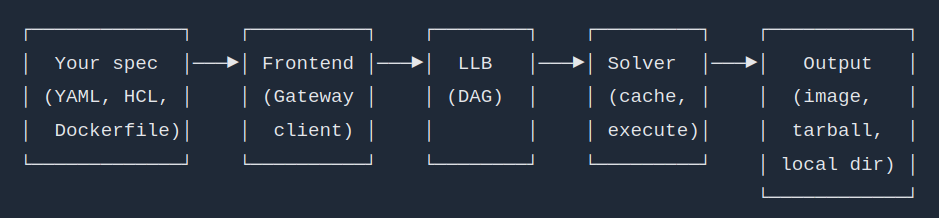
Maybe the page was changed? If you're just talking about the gaps between lines, that's just the line height in whatever source was used to render the image, which doesn't say much about AI either way.
looks fine to me but since it messed up for some so i replace it with png
I found it more jarring that they chose to use both Excalidraw and ascii art. What a strange choice.
the hugo theme requires an image thumbnail. i just find one and use it :D
Crafted by Rajat
Source Code